


Live Connections to Remote Databases with Federated Tables


Getting your data connected is usually the first step in working with the CARTO platform. That data might be in files databases URLs services etc. The options are numerous so we offer a wide range of connectivity capabilities to different sources—each coming with its own benefits and tradeoffs.
At the end of the day every dataset connected to CARTO gets represented in the form of a table but these come in distinct flavors:
- Native Tables: When data is pushed to CARTO for management native PostgreSQL data tables are created. This is the case when you upload a file like a Shapefile CSV GeoJSON or Geopackage. Data from any of these sources can be transformed like in any regular database.-Sync Tables: When connecting a remote file via a public URL Dropbox GDrive or ArcGIS Server data gets imported and cached in a table in CARTO that is usually updated automatically with the contents from the original dataset every X defined minutes. Connections to external databases where we use ODBC to connect to a remote database dump the data and cache it in CARTO also fall down under this category. We have already connectors for the major databases like PostgreSQL MySQL SQL Server and pretty much any database that supports ODBC. In this type of tables you can not modify the data in CARTO because at the next sync cycle we will replace the data from whatever comes from the source. This process makes CARTO very performant with our internal database. But what happens when you can’t or you don’t want to cache the data in CARTO?
Introducing Federated Tables
Technically a Federated Table is a PostgreSQL Foreign Data Wrapper to a remote server allowing us to perform live queries to a remote database. Think of it as a virtual table that looks like a regular sync table in CARTO — but when used makes the queries you perform in CARTO travel to the remote database and get executed there.
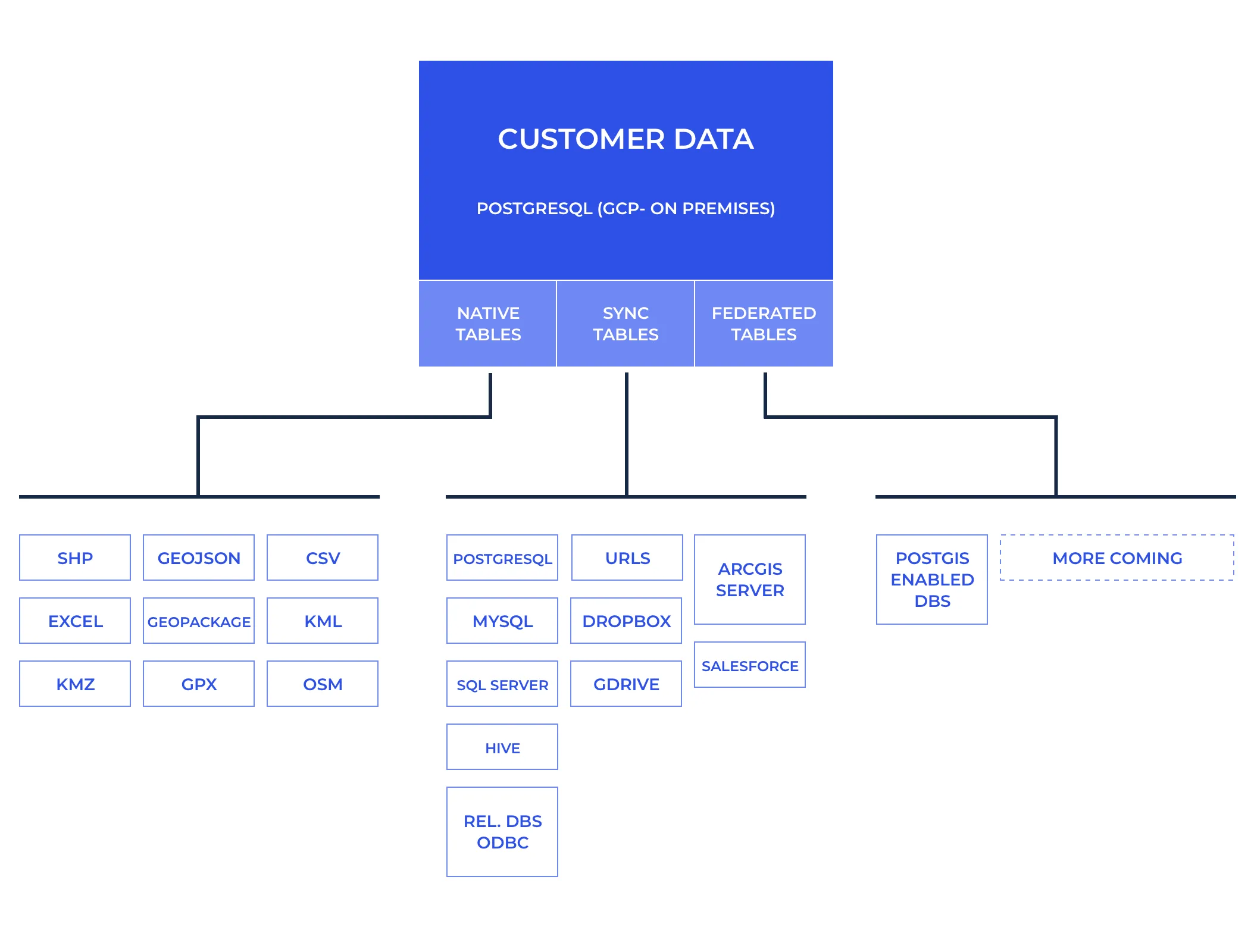 Use cases for federated tables include:
- Having frequently changing data that you join with other tables in CARTO. Because queries are dynamically executed on your remote server there is no need for continuous refreshes.- Having a large amount of data that is dificult to sync with CARTO but that you only need to query distinct parts of like in the case of time-series databases.- You want to leverage the scalability or low latency of your cloud database from within the CARTO ecosystem. So technically this means that when you do a query to make a choropleth map:
SELECT geog_data.the_geom_webmercator fdw_data.lotarea FROM fdw.mappluto_18v2_1 as fdw_data INNER JOIN public.mappluto_18v2_1 as geog_data ON fdw_data.cartodb_id = geog_data.cartodb_id WHERE fdw_data.cartodb_id <20 CARTO will push the filters to the federated database executing for example:
SELECT cartodb_id lotarea FROM public.mappluto_18v2_1 WHERE ((cartodb_id < 20)) And then join locally the data inside CARTO and execute any spatial operations that could not be sent to the federated database.
But wait there’s more! We have extended the capabilities of Foreign Data Wrapper to push spatial aggregations and filters down to the remote server. That of course requires the usage of a remote server that has PostGIS capabilities (which Aurora Citus AWS RDS and Google Cloud SQL does!). In that case when you run a query like the following to retrieve a vector tile:
SELECT ST_AsMVT(rows.*) mvt FROM ( SELECT ST_AsMVTGeom(the_geom_webmercator TileBBox(13 2412 3079)) as geom numfloors FROM fdw.mappluto_18v2_1 WHERE the_geom_webmercator && TileBBox(13 2412 3079) ) rows; The remote server will run the following SQL:
SELECT the_geom_webmercator numfloors FROM public.mappluto_18v2_1 WHERE ((the_geom_webmercator OPERATOR(public.&&) $1::public.geometry)) Which means that we have pushed the spatial filter down to the remote server and the query took ~15 seconds to run which is too slow for a tile request.
We can break down the time the query took into 3 steps:
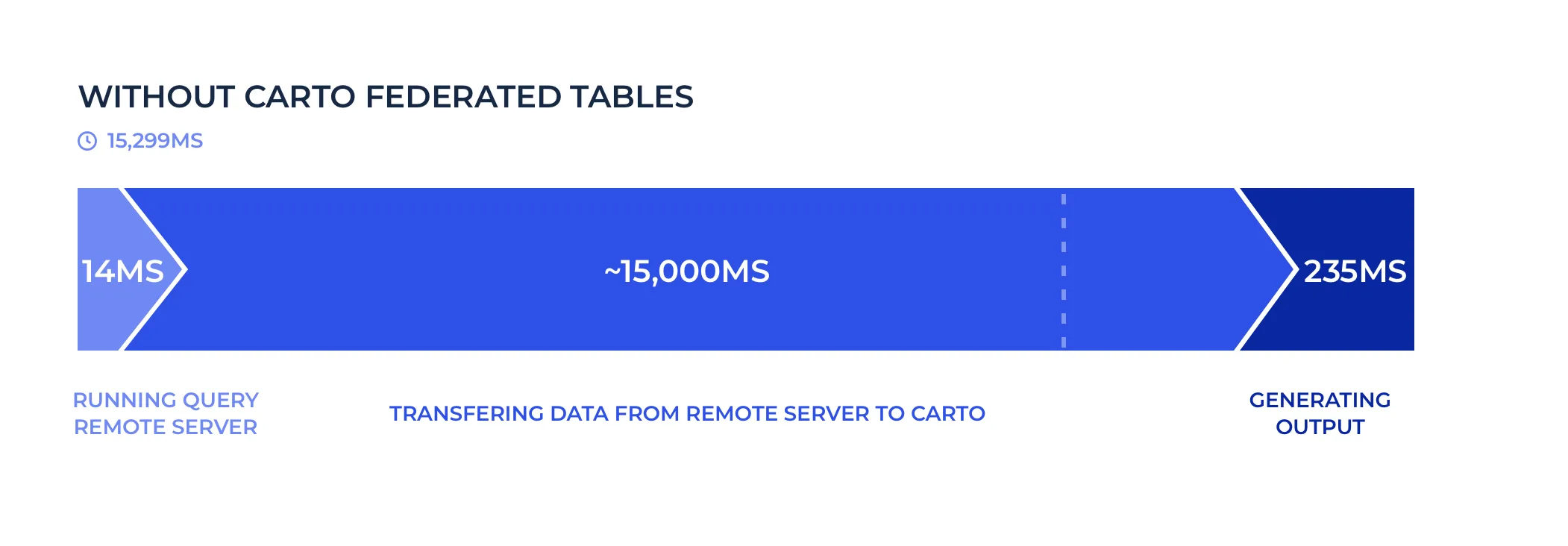 In total ** 3200 KB**were transferred from the remote to the local server.
With our implementation running the same query the remote server will run ALSO the spatial aggregation defined by ST_AsMVT:
SELECT public.st_asmvt(q) FROM ( SELECT public.st_asmvtgeom(the_geom_webmercator ‘BOX(-8238077.15931641 4970241.32652345 -8233185.18950684 4975133.29633302)’::public.box2d 4096 256 true) numfloors FROM carto_lite.mappluto_18v2_1 WHERE ((the_geom_webmercator OPERATOR(public.&&) $1::public.geometry)) ) q And that query now runs in840 miliseconds. That’s17x faster!
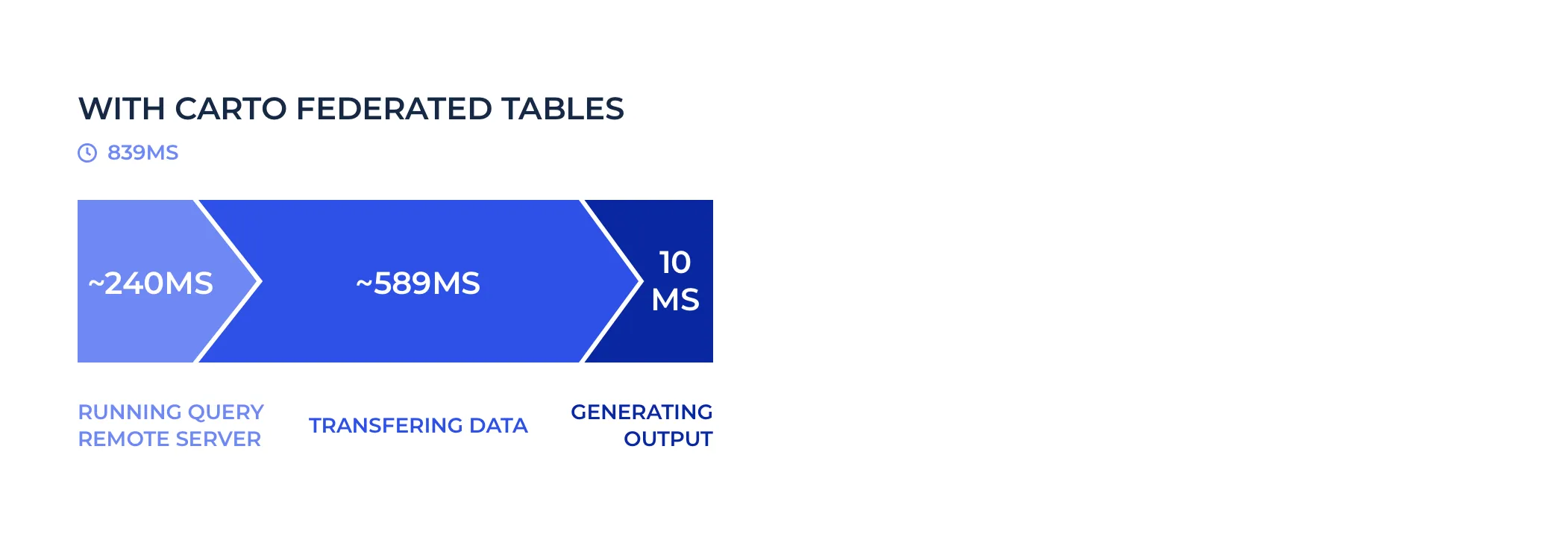 In this scenario ** 285 KB** were transferred between both servers.
As you can see by pushing down the filter and the aggregation to the remote server we only send the minimum data between servers speeding up the federated queries tremendously. Of course there will always be latency for running a query between different cloud providers (Google Cloud and AWS in this case) and locations but if servers are close by and ideally on the same cloud provider latency shouldn’t be an issue.
We have worked hard to ensure that the maximum possible set of filters and aggregations get passed through to the original database to reduce the payload between servers and take advantage of the capabilities of the remote database. Still there are some cases where tuning will be necessary and we will be there to help you with non performant queries and keep pushing the limits of federated tables. Talk to us!
Designed for cloud databases and on-premise
Right now we have implemented and heavily optimized this functionality to connect to the rich PostgreSQL ecosystem like:
- AWS RDS GCP Cloud SQL Azure Database for PostgreSQL.- Auto-scaling databases compatible with PostgreSQL like Amazon Aurora and Hyperscale (Citus) on Azure Database. Depending on the destination database the performance of spatial operations might be different because of their version of PostGIS (the spatial extension of PostgreSQL). We will follow with more specific measurements in follow-ups blog posts.
We have plans to add support to other databases including SAP Hana Oracle SQL Server and Cloud Spanner so if you are interested in any of those please let us know!
Do you want to start using Federated Tables?
We are glad you are interested! We would love to talk to you about activating this functionality on your CARTO account or discuss your connectivity needs to other databases and warehouses.
Get in touch! Let us know what your connectivity needs are
Don’t forget to share this post on Linkedin!