Bringing Geospatial to ADBC: How We're Unifying Data Transfer Across Every Cloud Warehouse


At CARTO, we move geospatial data between DuckDB and cloud data warehouses constantly — it’s at the core of our import/export pipeline. For years, every platform required its own bespoke integration: different CLIs, different staging buckets, different credential setups, and different geometry conversion functions. With DuckDB 1.5 shipping a native GEOMETRY type backed by GeoArrow, we saw an opportunity to replace all of that with a single, standards-based approach.
Over the past weeks we’ve been contributing geospatial support to the Arrow Database Connectivity (ADBC) drivers for Snowflake, BigQuery, Databricks, Redshift, Oracle, and PostgreSQL. This post is a status report: what works, what’s still open, and why we think this matters for the entire geospatial ecosystem.
The Problem: Six Warehouses, Six Pipelines
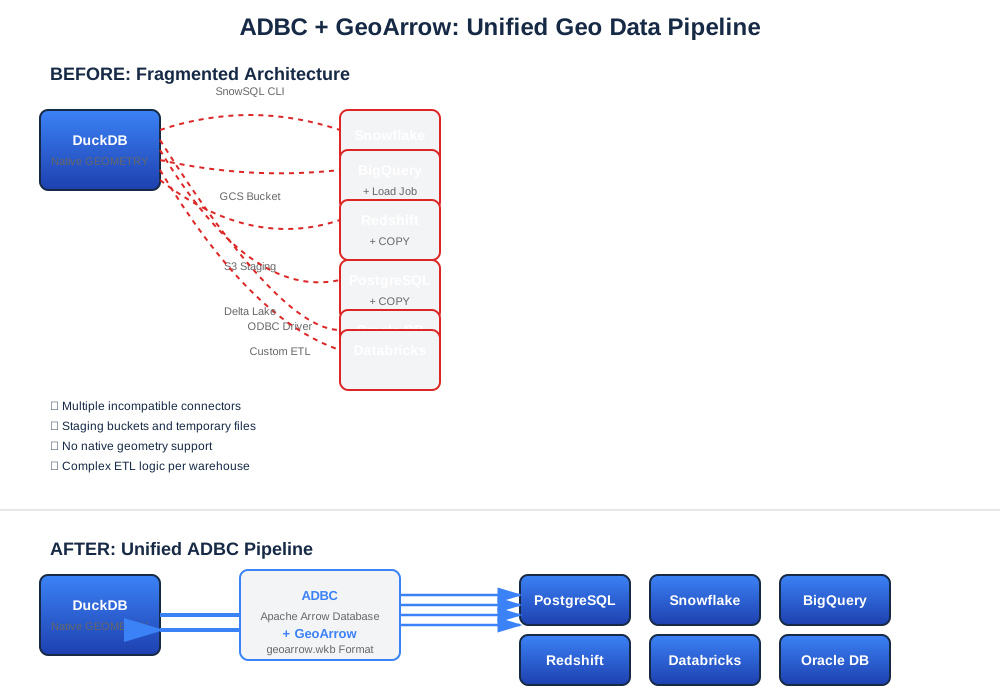
Every cloud data warehouse has its own way of staging and loading geospatial data. Here’s what a typical workflow looked like before:
- Snowflake: Install SnowSQL CLI → convert geometry to WKT → write Parquet → PUT to internal stage → COPY INTO → run
TRY_TO_GEOGRAPHY - BigQuery: Set up a GCS bucket with HMAC keys → upload WKT Parquet → LOAD DATA → run
ST_GEOGFROMTEXT - Databricks: Configure Unity Catalog Volumes → upload Parquet via REST → run
ST_GeomFromWKB - Redshift: Configure S3 with IAM credentials → upload Parquet → COPY INTO → run
ST_GeomFromWKB - Oracle: Set up S3 credentials on Oracle side →
DBMS_CLOUD.COPY_DATA→ runSDO_UTIL.FROM_WKBGEOMETRY
Each path needed different credentials, CLIs, staging infrastructure, and geometry conversion functions. The geometry conversion alone — serializing to WKT or WKB text and back — consumed 85–94% of total import time in some cases.
The Solution: ADBC + GeoArrow
ADBC provides a unified API for database access using Apache Arrow as the in-memory data format. Combined with the GeoArrow specification for encoding geospatial data in Arrow, we can build one pipeline pattern that works across all platforms:
DuckDB native GEOMETRY → geoarrow.wkb Arrow column → ADBC → Data Warehouse
Data Warehouse → ADBC → geoarrow.wkb Arrow column → DuckDB native GEOMETRY
No staging buckets. No platform-specific CLIs. No WKT/WKB text round-trips. Just Arrow-native binary data flowing through a standard API.
From DuckDB, the code looks identical for every warehouse:
-- Export: read from any warehouse into DuckDB native GEOMETRY
CREATE TABLE local_copy AS
  SELECT * FROM adbc_scan(connection, 'SELECT * FROM my_geo_table');

-- Import: write DuckDB native GEOMETRY to any warehouse
SELECT * FROM adbc_insert(connection, 'my_geo_table',
  (SELECT * FROM local_data));
How It Works Under the Hood
DuckDB 1.5’s native GEOMETRY type uses the geoarrow.wkb format internally. When DuckDB sends data through ADBC, geometry columns carry ARROW:extension:name = "geoarrow.wkb" metadata in the Arrow schema. The ADBC driver on the receiving end detects this metadata and creates a GEOGRAPHY or GEOMETRY column instead of a plain BINARY column.
For export, the reverse happens: the driver detects geospatial columns in the warehouse, tags them with geoarrow.wkb Arrow extension metadata, and DuckDB’s adbc_scanner automatically maps them to native GEOMETRY.
The key insight: the geometry data stays in binary WKB format throughout the entire pipeline — no serialization to text, no parsing, no conversion. Only the Arrow schema annotation changes.
What We Built (and Where We Filed PRs)
Getting this to work required changes across multiple ADBC drivers, Go libraries, and warehouse-specific extensions. Here’s the warehouse-by-warehouse breakdown.
Snowflake
Import (adbc-drivers/snowflake#99): We added detection of geoarrow.wkb columns from Arrow metadata, then a post-COPY conversion step using TRY_TO_GEOGRAPHY, since Snowflake’s COPY INTO cannot load WKB directly into GEOGRAPHY columns from Parquet.
Export (adbc-drivers/snowflake#100): We set GEOGRAPHY_OUTPUT_FORMAT=WKB at the session level so data arrives as binary WKB instead of GeoJSON strings. However, Snowflake’s REST API loses column type information when the output format changes — rowtype metadata reports binary instead of geography. Our workaround is a DESCRIBE TABLE query before each scan.
Databricks
Databricks required changes across three repositories:
- A Thrift-level
geospatialAsArrowflag in the Spark SQL Go driver (databricks-sql-go#328) - GeoArrow conversion in the ADBC driver that transforms Databricks’ internal
Struct<srid, wkb>format to standardgeoarrow.wkb(adbc-drivers/databricks#350) - Staging + COPY INTO bulk ingest to replace unusable row-by-row INSERT at ~0.7 rows/sec (adbc-drivers/databricks#247)
Redshift
The best surprise: Redshift’s ADBC driver already emits geoarrow.wkb metadata natively. Geometry flows through as DuckDB GEOMETRY with zero configuration. The one gap: the driver strips the SRID from EWKB headers but doesn’t propagate it to the Arrow schema (adbc-drivers/redshift#2).
Oracle
Oracle required a completely custom ADBC driver (jatorre/adbc-driver-oracle) written in Go with client-side SDO_GEOMETRY ↔ WKB conversion via direct TNS wire protocol UDT encode/decode. We also had to fix a bug in the go-ora VARRAY encoding (go-ora#721) — a single byte change from 0xFE to 0xFF that was causing ORA-00600 internal errors.
BigQuery
BigQuery uses the DuckDB bigquery community extension rather than generic ADBC. We prototyped ADBC driver changes, but BigQuery’s Storage Write API only accepts WKT/GeoJSON for GEOGRAPHY — there’s no binary shortcut. The two-step approach (load as STRING, then CTAS with ST_GEOGFROMTEXT) is actually faster for mixed workloads at ~22K rows/sec vs. ~7K rows/sec through the Load Jobs path.
PostgreSQL
PostgreSQL doesn’t need ADBC at all. DuckDB’s postgres_scanner extension handles GEOMETRY directly via the PostgreSQL wire protocol, and it’s the fastest platform by far.
Compatibility Matrix
Here’s where things stand today across all six platforms:
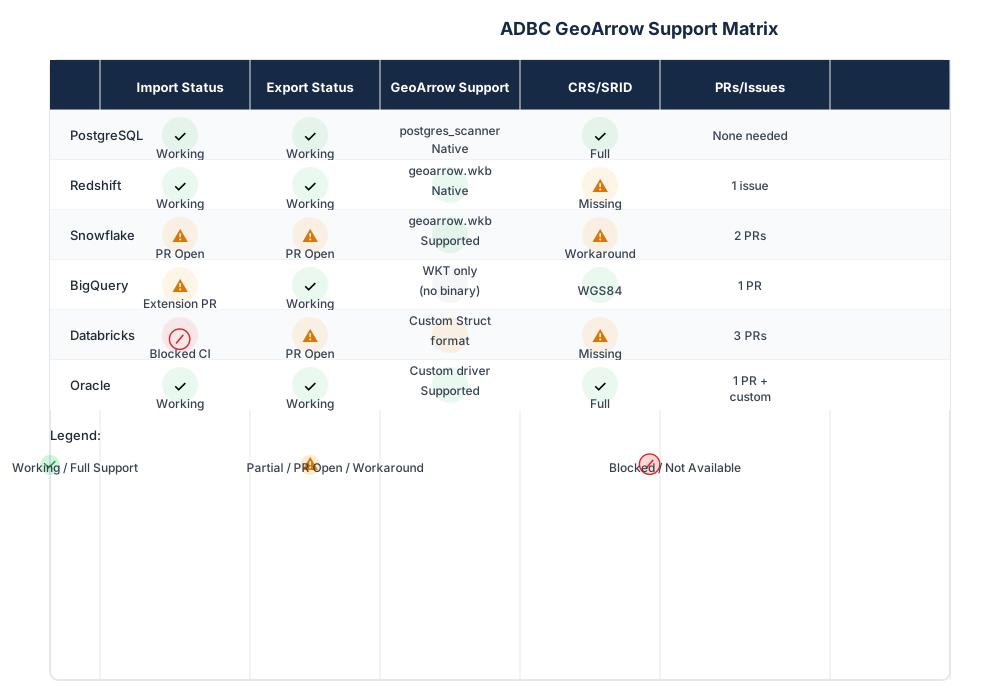
| Platform | Import | Export | GeoArrow Support | CRS/SRID | PRs |
|---|---|---|---|---|---|
| PostgreSQL | ✅ Working | ✅ Working | Native (postgres_scanner) | ✅ Full | None needed |
| Redshift | ✅ Working | ✅ Working | Native geoarrow.wkb | ⚠️ Missing | 1 issue |
| Snowflake | ⚠️ PR Open | ⚠️ PR Open | geoarrow.wkb | ⚠️ Workaround | #99, #100 |
| BigQuery | ⚠️ Extension PR | ✅ Working | WKT only | ✅ WGS84 | 1 extension PR |
| Databricks | 🔴 Blocked on CI | ⚠️ PR Open | Custom Struct format | ⚠️ Missing | 3 PRs |
| Oracle | ✅ Working | ✅ Working | Custom driver | ✅ Full | 1 PR + custom driver |
Performance
We benchmarked using Czech Republic OSM Geofabrik data — 5M building polygons, 1.9M road linestrings, and 465K POI points.
Import (Writing to Warehouses)
| Platform | Buildings (5M) | Roads (1.9M) | POIs (465K) | Method |
|---|---|---|---|---|
| PostgreSQL | — | — | ~111,000 | postgres_scanner native |
| Redshift | 106,654 | 71,750 | 51,629 | ADBC (S3 staging) |
| Snowflake | 68,611 | 56,804 | 38,119 | ADBC + geoarrow.wkb |
| Databricks | — | — | 46,320 | Volume + CTAS |
| BigQuery | 21,646 | 21,907 | 26,222 | Storage Write API |
| Oracle | 8,379 | — | 21,580 | ADBC direct UDT |
Rows/sec, end-to-end including geometry conversion
Export (Reading from Warehouses)
| Platform | Throughput | Method |
|---|---|---|
| PostgreSQL | ~2,835,000 rows/sec | postgres_scanner native |
| Snowflake | ~96,000 rows/sec | ADBC + geoarrow.wkb |
| BigQuery | ~64,000 rows/sec | Storage Read API |
| Oracle | ~60,000 rows/sec | ADBC + geoarrow.wkb |
| Databricks | ~31,000 rows/sec | ADBC + geoarrow.wkb |
| Redshift | ~28,700 rows/sec | ADBC + geoarrow.wkb |
The Before/After Story
To put these numbers in perspective, here’s Snowflake import before and after:
Before (WKT + SnowSQL staging): Install SnowSQL CLI → configure internal stage → serialize geometry to WKT → write Parquet → PUT → COPY INTO → CTAS with TRY_TO_GEOGRAPHY → drop staging table. Result: ~8,600 rows/sec via ADBC’s old WKT path.
After (ADBC + geoarrow.wkb): One SQL statement from DuckDB — adbc_insert(connection, 'table', query). Result: 38,000–68,000 rows/sec. No CLI, no staging files, no storage bucket credentials.
Similar story across all platforms. Redshift went from requiring manual S3 + IAM setup to the driver handling staging internally. Oracle went from S3 + DBMS_CLOUD at ~2,100 rows/sec to direct UDT insertion at 8,400–21,000 rows/sec.
Open Challenges
GEOMETRY SRID
GEOGRAPHY columns always use WGS84 (SRID 4326), so CRS metadata is straightforward. But GEOMETRY columns can have any SRID, and it’s not available in the Arrow schema until data has been read. The GeoArrow spec requires column-level CRS metadata, but the SRID is per-row in most databases. This creates a fundamental tension with Arrow’s streaming model where the schema must be known before any data is sent. The GeoArrow community is discussing this in geoarrow/geoarrow#94.
Snowflake Type Metadata
Snowflake’s REST API loses the original column type when the output format changes to WKB — both rowtype metadata and DESCRIBE RESULT report binary instead of geography. We work around it with DESCRIBE TABLE, but this doesn’t cover arbitrary queries. We’ve reported this to Snowflake.
Databricks CI
The bulk ingest PR (#247) replaces row-by-row INSERT (~0.7 rows/sec) with Volume + COPY INTO (15–23K rows/sec), but is blocked on CI configuration for volume access.
Why This Matters
This isn’t just about making CARTO’s pipelines faster. By contributing these changes upstream to open-source ADBC drivers, we’re helping every tool in the Arrow ecosystem handle geospatial data correctly. Any application that uses ADBC — not just DuckDB — will benefit from proper GeoArrow support in these drivers.
At CARTO, we believe the geospatial ecosystem advances fastest when the standards are open and the infrastructure is shared. We’ve been building on open standards since our earliest days, and contributing to the ADBC and GeoArrow ecosystems is a natural extension of that commitment.
Get Involved
We need help getting these PRs reviewed and merged. If you’re a maintainer or contributor to any of these ADBC drivers, please take a look at the open pull requests linked above. If you’re hitting similar issues with geospatial data in your ADBC workflows, your test cases and bug reports are incredibly valuable.
All code, benchmarks, and testing scripts are available at github.com/jatorre/duckdb-warehouse-transfer.
If you want to discuss any of this, find us on the GeoArrow GitHub discussions or reach out to us directly at CARTO.